Showing posts with label ida. Show all posts

Sunday, November 18, 2012

TDD & IDAPython

This is just a short note in which I want to share my experiences with writing test code for (IDAPython) scripts I use and produce on a daily basis.

The case for Test-Driven Development

A while ago, I thought it would be a good idea to advance my coding skills. So I had a look around methodologies that are popular in software development but that I had not tried myself.
The best candidate seemed to me Test-Driven Development (TDD) as I was familiar with the concept of unit testing but I was not able to believe that TDD can drive architecture and design decisions.

I started reading the Clean Code series of books by Uncle Bob. The books start out with general advice on how to structure your code in a way it is easier to understand and maintain. I recognize these books as an efficient way to lift your own coding habits to an acceptable level if you plan on publishing code.
In the later chapters the book focusses on TDD. I transferred the given example projects to Python (instead of Java, which the book uses) and really tried hard to embrace TDD as driving method for code generation.

- Well, didn't work out so far for me. ;)
Personally, I still have the impression TDD slows me down too hard when initially implementing functionality. That's because there is only a very limited time frame when doing analyses and helper scripts are mostly tailored to specific use cases and often not part of the analysis result. So the code has limited value to me.
Additionally, refactoring and restructuring can probably become more painful as you obviously have to change both production and testing code. But this is a wrong assumption as I will later point out.
However, I understand the argument that finding & fixing bugs is more expensive in regards of time than preventing to having bugs in first place. But as my projects (helper scripts) usually have a few hundred lines at most and many are even one-shot tools, the overhead does not fit. For large projects, I would definitely give TDD a shot.

Nevertheless, over trying TDD, I really started liking to have tests for my code for the following reasons:
  • Tests give me increasing confidence instead of the feeling that I'm piling up a house of cards that may collapse with additions.
  • Writing tests to fix bugs both documents the bugs and offers valuable insights in my shortcomings when writing the code in first place. Helps to avoid the same errors in the future.
  • My code itself has become much more modular as I'm looking out to have it testable. Refactorings actually have become easier.
  • Tests come in as a free documentation on how to actually use the code, both a help for myself (looking my code again after some months) as well as for others.
  • I only have to write tests for parts of the code I think that are worth being covered by tests ("complex"), indicated by me having had to think about them for some time before simply pinning them down.
  • Executing successful tests is quite satisfying.
So I regularly produce "test-covered" code now, instead of "test-driven" code which I'm pretty happy with. Should have done that with IDAscope as well but I'll add tests for all future bugs I find, I guess.

Tests in IDAPython

So how to use this now in IDA? Here is my template file for writing tests:

import sys
import unittest
import datetime
from test import *

import idautils

class IDAPythonTests(unittest.TestCase):

    def setUp(self):
        pass

    def test_fileLoaded(self):
        assert idautils.GetInputFileMD5() is not None


def main(argv):
    print "#" * 10 + " NEW TEST RUN ## " \
        + datetime.datetime.utcnow().strftime("%A, %d. %B %Y %I:%M:%S") \
        + " " + "##"
    unittest.main()


if __name__ == "__main__":
    sys.exit(main(sys.argv))

In this template we have only one test in our test case "IDAPythonTests" called "test_fileLoaded". Tests to be executed by the Python unittest testrunner use the prefix "test_".
Normally you would not test directly against IDAPython's API as in this example but would rather test your own code through function calls, with your code usually being located in a different file and imported into the test case.

You can run this as a script within IDA while having loaded a file for analysis. This allows you to specifically test your code against IDAPython's API on the one hand and using the contents of the file under analysis for verification on the other hand.
The output of the above script while having loaded a file and not having loaded a file to demonstrate the test's behaviour looks like this:

---------------------------------------------------------------------------------
Python 2.7.2 (default, Jun 12 2011, 15:08:59) [MSC v.1500 32 bit (Intel)] 
IDAPython v1.5.5 final (c) The IDAPython Team <idapython@googlegroups.com>
---------------------------------------------------------------------------------
########## NEW TEST RUN ## Sunday, 18. November 2012 11:49:29 ##
.
----------------------------------------------------------------------
Ran 1 test in 0.010s

OK
########## NEW TEST RUN ## Sunday, 18. November 2012 11:50:06 ##
F
======================================================================
FAIL: test_fileLoaded (__main__.IDAPython_Tests)
----------------------------------------------------------------------
Traceback (most recent call last):
  File "Z:/ida_tests.py", line 14, in test_fileLoaded
    assert idautils.GetInputFileMD5() is not None
AssertionError

----------------------------------------------------------------------
Ran 1 test in 0.000s

FAILED (failures=1)

Pretty much the IDAPython shell we are used to + the nice output from Python's unit testing framework.

Monday, September 17, 2012

IDAscope Release!

Good News for all people interested in IDAscope.
I submitted the extension to the Hex-Rays contest two days ago and today I want to follow up promises and release a first public version.

You can find the repository we will use to publish future updates here:

https://bitbucket.org/daniel_plohmann/simplifire.idascope/

There is a prepared download for version 1.0. You can also checkout via git from the repo (right now they have the same content).

For installation instructions, feature description and usage, check out the manual located in IDAscope/documentation/manual/.

A big THANK YOU to all people who did a beta test of IDAscope. You provided very helpful feedback!

We hope it turns out to be an useful addition to IDA Pro. Development does not stop here of course, as we plan to continue the project to integrate more features.

We are open to feedback, so don't hesitate to tell us your opinion!

UPDATE 18.09.2012: There was a bug in the initial release that has been fixed. Check out the following blog post for details and a new feature!

Saturday, September 1, 2012

IDAscope beta update

Nothing much to blog about. Therefore, only a short update on IDAscope's progress.
I just pushed out a second beta version to the people that expressed interest in testing it. If you are interested, too, this announcement is still valid. ;)

Here is a list of changes/fixes included with the second beta:

Function Inspection:
- Added functionality to create functions from unrecognized code. This function will first try to find and convert function prologues (push ebp; mov ebp, esp) and then convert the remaining undefined code.
- Added functionality to identify and rename potential wrappers (small functions with exactly one call referencing an API function). Thanks to Branko Spasojevic for this contribution.

WinAPI:
- Fixed path resolution for html files, should work on non-Windows operating systems now, too. Thanks to Sascha Rommelfangen for fixing this, I only have IDA versions on Windows available so I could hardly debug this.
- Included a back/forward button to allow easier browsing of visited articles.

Crypto Identification:
- Adjusted default parameters to a tighter set, resulting in less false positives on startup.
- Added some crypto signatures (CRC32 generator, TEA/XTEA/XXTEA).

The public release will be in two weeks from now.

Monday, August 20, 2012

IDAscope Beta


I've finished writing Epydoc-compatible documentation for the code and changed some more minor things. This basically summarizes my weekend. So here is just a short announcement for today.

Beta-Test


If you are interested in beta-testing IDAscope, please write an email to:

idascope <at> pnx <dot> tf

including the operating systems you run IDA on, the version of IDA you have and a short reason why you are interested in the plugin / what you usually use IDA for. E-Mail is required, so I can provide you a download link.

Note: IDAscope is completely Qt-based (requires PySide installed along IDA to run) and I could only test it with IDA 6.2 and 6.3 on x86 Windows so far. Therefore, I'm mostly interested in other setups.

I'll hurry in preparing a release package (with a short manual), you should get a notification in the next days.
Depending on the number of requests, I'll limit beta-testing to a group of users that covers a maximum of variety in system/IDA setups and versatility in IDA usage.

Don't be sad if you are not in that group because the official release of the first version will hopefully be following the beta quickly!

Wednesday, August 15, 2012

IDAscope update: Crypto Identification

After being quiet for almost three weeks, today I want to share with you my latest additions to IDAscope.

Focus of this post will be a new widget that I call Crypto Identification.
Now you may say "oh no, yet another crypto detection tool?" Well, yes, but before you stop reading let me introduce you to an approach you might find useful.

Heuristics-based crypto detection by code properties

About 2 years ago, during literature research on network protocol reverse engineering, I came across an interesting paper called "Dispatcher: Enabling Active Botnet Infiltration using Automatic Protocol Reverse-Engineering" by Juan Caballero et al. Besides the description of an approach on how to identify and dissect message buffers into protocol fields, it contains a section on automated detection of cryptographic routines ("Detecting Encoding Functions", p. 10).
The main idea is pretty straight forward:
  1. Evaluate the ratio of arithmetic/logic instructions related to all instructions in a function.
    Assumption: Cryptographic functions usually consist mainly of
    arithmetic/logic instructions, thus they should have a higher ratio.
  2. If the function has a size of 20 or more instructions, flag the function as encoding function.
While the approach described in the paper is applied to dynamically achieved instruction traces, there is no reason why not to employ it in static code analysis. So my goal for today is to show you how to make "academic things" practically usable. ;)

I use the following set of arithmetic/logic instructions, please tell me if I missed something:
  • ["add", "and", "or", "adc", "sbb", "and", "sub", "xor", "inc", "dec", "daa",
    "aaa", "das", "aas", "imul", "aam", "aad", "salc", "not", "neg", "test", "sar",
    "cdq"]
The following screenshot shows the widget in action:
IDAscope: Crypto Identification widget
The functionality I just described is located in the upper part of the widget. There are three double-sliders that can be used to adjust the following parameters:
  • Range of Arithmetic/Logic Rating: The above mentioned ratio of
    arithmetic/logic instruction to total instructions, but calculated on basic
    block level instead of function level.
  • Considered Basic Block Size: Only blocks having a size within the
    boundaries are taken into concern.
  • Allowed Calls in Function: Number of calls allowed from the function
    containing the analyzed basic block to any other code location. This is
    based on the assumption that most actual cryptographic/compression
    functions are "leafs" in the overall program flow graph, not having any
    child functions.
With these filter functions, we can greatly narrow down the number of suspicious basic blocks to those really containing interesting crypto or compression algorithms. Once the initial scanning has been performed (sample with 700 functions, less than one second), the sliders update the visualization in real-time. Qt only chokes when viewing all 9500 basic blocks at once, but that's not what you want anyway.

The two checkboxes give further ways to refine the search:
  • Exclude zeroing Instructions: This can be used to reduce false positives
    that may distort the rating. You will often find instructions like xor eax, eax
    or sbb eax, eax being used to clear register contents. However, they would
    normally be included in the calculation of the rating because XOR is in the
    set of arithmetic/logic instructions.
  • Group Results by Functions: This is just an alternative display method,
    giving a better overview on how many suspicious blocks are contained in
    the same functions.
Here is a use case for this widget: When I am trying to identify cryptography in malware samples, I often have problems finding compact but frequently used crypto algorithms such as RC4 that usually do not carry constants with them (which would allow to spot them by simple signature matching).
In the above screenshot (from a current Citadel sample with 724 functions) you can see that the candidate blocks have been reduced to 23 out of 9526 basic blocks. The filters are set to show only blocks with a rating of above 30%, with a size of 10 or more instructions and 1 or 0 call instructions. 23 blocks is a number small enough for me to look at in just a few minutes, identifying the relevant parts in a very short amount of time.

Among the 23 blocks is the following one:
Citadel's modified stream cipher.
containing the modified stream cipher that is used in Citadel. In addition to the normal XOR/substitutions, Citadel also XORs against the characters of a static hash contained in the binary, which is considered one of the "advancements" from its predecessor Zeus 2.
While this may be a weak example because the block is easily identified by searching for exactly this hash, you probably get the idea on how to use the widget.
The heuristic also successfully identifies all the other crypto parts in the sample like the AES and CRC32 algorithms.

If you wonder about how you get double-sliders in Qt (because it is not a standard widget): The idea and code of this widget called "BoundsEditor" is adapted from Enthought's TraitsUI, which luckily is open-source software. I took the code and reduced it back to a standard Qt widget, having a great and compact control element to adjust my parameters.

Signature-based crypto identification

The second part of the widget does what you might have expected in the first place. It simply uses a set of constants in order to find well-known cryptographic algorithms. It's basically inspired by tools like the IDA findcrypt plugin or the KANAL plugin for PEiD. It does the same job, except being directly coupled to IDA and allowing to instantly jump to the code locations referencing the identified constants.
The following screenshot (from an old but gold conficker sample) shows both types of matches:

  • [black] referenced by: constant somewhere (e.g. data section), referenced by code.
  • [red] referenced by: constant immediately used in code, just as shown in the basic block to the left.
The currently supported algorithms are (with ingredients from Ilfak Guilfanov's findcrypt, Felix Gröbert's kerckhoff's, a crypto detection implementation by Felix Matenaar from his Bachelor thesis, and some of my own adaptions):
  • ADLER 32
  • AES
  • Blowfish
  • Camellia
  • CAST256
  • CAST
  • CRC32
  • DES
  • GOST
  • HAVAL
  • IDEA
  • MARS
  • MD2, MD5, MD6
  • MD5MAC
  • PKCS (various initialization values)
  • RawDES
  • RC2, RC5
  • Rijndael
  • Ripe-MD160
  • SAFER
  • SHA224
  • SHA256
  • SHA384
  • SHA512
  • SHARK
  • SKIPJACK
  • SQUARE
  • Serpent
  • Square/SHARK
  • TIGER
  • Twofish
  • WAKE
  • Whirlpool
  • Zlib
The only thing missing right now is renaming / tagging those functions based on the signatures, maybe I will implement that, too.

Other changes to IDAscope

To conclude this post, I want to briefly discuss some more changes I did to IDAscope since the last post.
  • In my last post, I mentioned that the WinAPI widget only worked against the
    offline data from the Windows SDK. This is no longer the case, as it now
    supports doing online lookups (controllable by a checkbox) in the case it
    does not find local information. This is great because by that, the missing
    documentation of CRT and NTDLL functions are now also covered. Parsing
    of the MSDN webpage can be optimized but works for now.
  • Hotkey support for widgets. As an example, [CTRL+Y] will now look up the
    currently highlighted identifier (in IDA View) in the WinAPI widget and
    change focus to this widget.
  • More changes under the hood, data structures, refactoring, etc. I feel that
    the code is better organized and easier to understand now.
  • Experimental code for visualizing the function relationship starting by
    Thread start addresses (cmp. Alex' last blog post).
Next to come is the integration of Alex' latest scripts into widgets.

Wednesday, July 25, 2012

IDAscope update: WinAPI browsing

A week has passed since my last blog post, so it's time to give an update on the current status of development for IDAscope. The title mentions WinAPI browsing, which I am introducing later in the post. First I want to give a follow up on the need for data flow analysis I explained in the last post.

IDAscope + Data flow analysis?

In my last post, I mentioned that one of the next steps would be data flow analysis of parameters to get a better interpretation of API calls. While I am still pursuing this, I realized that it will come not in as easy as I hoped. At least when I want to do it properly. While having studied CS and not having tried to circumvent lectures on theory, I went back to basics and started reading on data flow analysis. Soon, I realized that I have rusted already a little bit, doing more practical work than I probably should have (at least for being in an academic environment). However, the first two chapters were pretty illuminating and helped me to grasp the message of Rolf Rolles' keynote at REcon better.
I took the following lessons from my peek into this book:
  • There are well-defined, nice mathematical frameworks to perform data flow analysis.
    Efficient algorithms are available in pseudo code, so most of the work has been done already.
  • Intraprocedural data flow analysis is enough for what we need here.
    Having Def/Use-chains would be great.
  • Implementing this generically will take a lot of time. ;)
So for now I feel that it has more value to implement other functionality/ideas for easing the reverse engineering workflow first than putting together a full data flow framework. I still have this on the agenda but I will probably come up with a very simplified version (say: hack) that will at least show reference in a way IDA does it already (incl. clickable reference):

Possible substitution for full data flow analysis.
However, I still see the potential of data flow analysis and will pick this up later on, I guess.
If you have a hint on how to integrate data flow analysis at this point without introducing much external dependencies, let me know.

IDAscope: WinAPI browsing

Reading my last blog again, it turns out the "long-term targeted functionality to have MSDN browsing embedded in IDAscope" was a lot easier to do than initially assumed.

The starting point to this was given to me by Alex. As you might know, there comes a very handy information database along with a Windows SDK installation. In its program files folder, there is a subfolder "help/<version number>", containing roundabout 250 *.hxs files, which are basically "Microsoft Help Compiled Storage" files. Treating them with 7zip results in about 130.000 files, consuming 1.4 GB space. Most of them are simple HTML files, probably similar to the MSDN available online.
What is great about those files, is the indexing/keyword scheme used by Microsoft, explained here and here.
Just to show you what I am talking about, example "createfile.htm":
[...]
<MSHelp:Keyword Index="F" Term="CreateFile"/>
<MSHelp:Keyword Index="F" Term="CreateFileA"/>
<MSHelp:Keyword Index="F" Term="CreateFileW"/>
<MSHelp:Keyword Index="F" Term="0"/>
<MSHelp:Keyword Index="F" Term="FILE_SHARE_DELETE"/>
<MSHelp:Keyword Index="F" Term="FILE_SHARE_READ"/>
<MSHelp:Keyword Index="F" Term="FILE_SHARE_WRITE"/>
<MSHelp:Keyword Index="F" Term="CREATE_ALWAYS"/>
[...]

Parsing this information was trivial, leaving us with a dictionary of 110.000 keywords (API names, structures, symbolic constants, parameter names, ...) pointing to the corresponding files.

Now we just need a way to visualize the data/html. I decided to use QtGui's QTextBrowser instead of QWebView, which would have been basically full WebKit. Mainly because it requires a full installation of Qt instead of only PySide as shipped with IDA Pro. Furthermore, QTextBrowser fully suffices our needs as it is able to render basic HTML of which the Windows SDK API documentation is comprised anyway.

The result looks like this:

WinAPI browsing via IDAscope.


The links you see in the picture there are all functional, which is really nice to get some context around the API you are currently reading about. And because of course we want to be hip, I used QCompleter to give search suggestions based on the keywords:

Clicking on the API names in the first picture shown above in the data flow section will also bring up the respective API page, changing window focus to the browser.
As possible future features for this, I think of extending the context menu (right click) of the IDA View by a "search in WinAPI" in order to ease use and also cover names that are not targeted by the set of semantic definitions. From my own usage experience, having a "back" button in the browser will also be essential, so I will add that soon, too.

A downside of using Windows SDK as exclusive data source is that information about ntdll and CRT functions is not included. Maybe I will add a switch for "online" mode, so you can still surf MSDN from within the window. But this has lower priority right now.

So not much technical stuff in today's post but I am positive that we can change that in the next one. I hope I have implemented the data flow "hack" by then. But the next main goal is to bring the subroutine exploration explained by Alex in his blog post into IDAscope. Based on the structural information generated through his scripts, I feel that there is more to gain from.

Wednesday, July 18, 2012

Introducing: IDAscope

About a week ago, I already announced on Twitter the progress for the IDA plugin called "IDAscope" Alex and I are currently working on, showing a screenshot. In this post, I want to roll out some basic thoughts on the idea behind the plugin and its motivation.

I feel that there is still a lot of potential for visually exploring the data contained in a binary being subject to analysis. And be it just by providing certain overviews that are not available by the stock versions of our analysis tools.
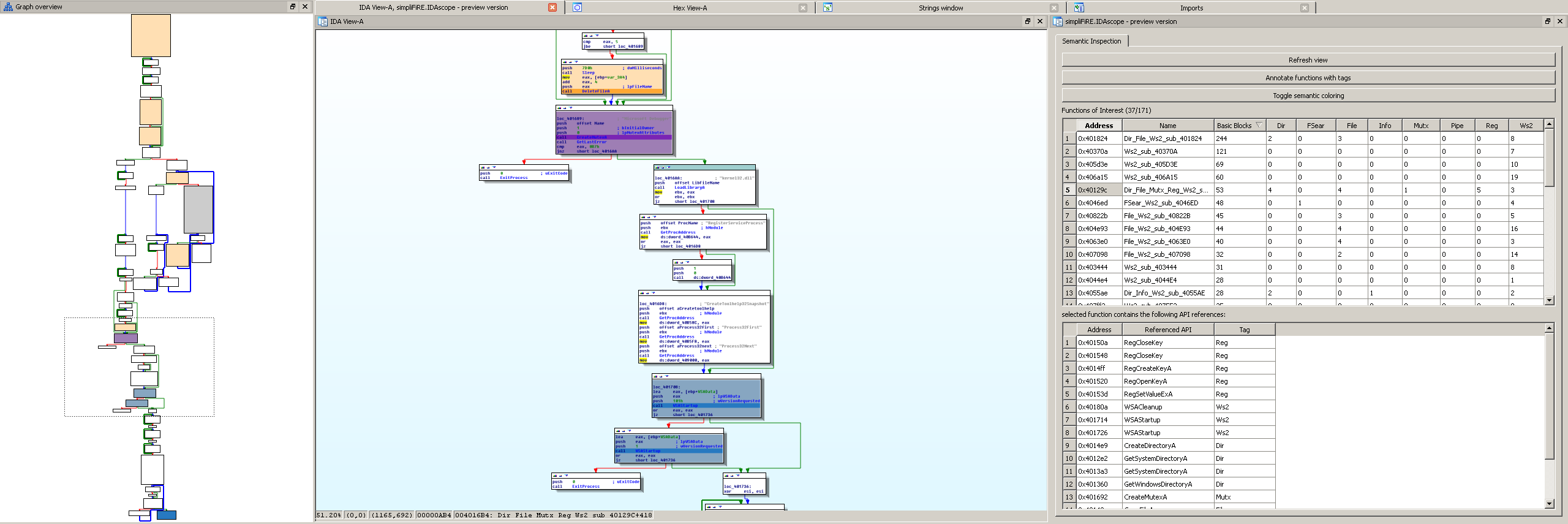
About a year ago, I started off with a little script that tagged unexplored (i.e. not renamed) functions with a short semantic description on what I assume is happening inside based on API calls. If there are calls to, let's say ws2_32!connect, ws2_32!send, ws2_32!receive there would be an extension of "net" to the default name "sub_c0ffee", yielding the name "net_sub_c0ffee". However, sorting by function names with the standard Funtion Window of IDA is unsatisfactory, as sorting by tags is just not possible. That brought up that I would need some kind of custom table visualization, like the one you might have already seen in my tweet. Here is the screenshot, so you don't have to click anything:
Introducing IDAscope
Introducing IDAscope.

I read a MindShaRE blog post by Aaron Portnoy on his journey with IDA/PySide and it was some kind of a door opener for me, as it showed me what would actually be possible by building own GUI extensions. By that time, I started working on the plugin but was thrown back when Aaron and Brandon announced Toolbag, which already in the Beta seemed to be a powerful implementation extending IDA with a lot of features that come in handy.
REcon set me back on track and now I am motivated again to pursue my plugin as I noticed that the focus of my plugin is different from theirs. The feedback of Alex also put in a lot of motivation, helping me to continue.

So after the REstart, the next step was to take the basic existing script as mentioned before and embedding it in some optimized graphic front end, resulting in the GUI as shown here:

Current state of "Function Inspection".

Having an overview of the tagged functions was just one step, having the relevant API calls responsible for the tag was a logical consequence. Right now, I am working on extracting the parameters to these function calls. For this, some basic data flow analysis is needed of course.

To support my point, I want to introduce you to my favorite malware sample: 92a1ad5bb921d59d5537aa45a2bde798. This is a very simple Spybot variant with timestamp of 2003, which I believe to be its true date. It's one of my standard samples used to teach RE at university. The sample is a good read and nice to study if you are new to malware analysis. Funny sidenote: it is only detected by 37/42 AVs on VirusTotal, despite having no protection, obfuscation, whatsoever.

From the 231 API calls tagged by IDAscope, the parameters to these API calls have pushes of the following type:
  • General Register -> 287
  • Immediate Value -> 263
  • Memory Reg [Base Reg + Index Reg + Displacement] -> 83
  • Direct Memory Reference to Data -> 21

This means that 60% of the parameters can be potentially resolved via data flow analysis, providing a more interesting value than "eax" or "[0x405004]" as it is in the current state of development. While this is only one example, I am confident that putting the effort into data flow analysis is worth it as it opens doors to other interesting use cases.

But even for the immediates there are more possibilities. Many of them can be further resolved as shown in the following example.
Think of:
push 0
push 1
push 2
call socket
a typical constellation as shown to you by IDA Pro.

By knowing the type of the parameter and the immediate value, we can directly resolve those to:
push IPPROTO_IP
push SOCK_STREAM
push AF_INET
call socket
which nets us the information that it is a TCP connection based on IP. While these are probably values you know by heart anyway, there is still a lot of moments where I find myself looking into MSDN in order to figure out what exactly is happening with this or that API call.
Long-term, I want to have some functionality for looking up APIs, structs and types via MSDN directly integrated into the plugin. I know that there are scripts by others that do this already, but often combination of features leads to emergence.

Another feature that is already integrated and that was shown in the tweet was the coloring of basic blocks based on the semantic type of the tag. Once you are used to the colors, this can really speed up navigation in a function using the Graph overview.

For my config, I use the following six colors:
  • yellow for memory manipulation
  • orange for file manipulation
  • red for registry manipulation
  • violet for execution manipulation
  • blue for network operations
  • green for cryptography

Right now, the highlighting is implemented in a 3-way cycle: use 6 colors, use standard color (all red), disable. Disabling is important because I noticed that you can also get to a point where you focus too hard on the colors and might miss other important spots.

We will not commit to any kind of release date as there is still a lot of ideas that might find their way into the first, official release. However, if you are interested or want to share ideas for features, let us know and we will see what we can do.

Alex will probably blog in the next days about another aspect of functionality that will find its way into the plugin, introducing a second tab.

Stay tuned for more news on IDAscope. :)

Tuesday, July 10, 2012

PNX.TF now with blog

I decided to start this blog as a test-balloon in order to complement my recently launched site pnx.tf.
There are multiple reasons for this.

First, I feel that it will help me to publish content easier, which is something I had in mind for some time already. Each blog entry is defined by its publishing time as well as optional tags, which allows for at least two comfortable ways of exploring it.
Furthermore, a notification on updates in form of feeds comes for free with the provided infrastructure, which is really handy. You readers can directly comment on the posts, too, another plus.

I didn't have any plans on integrating all that functionality into pnx.tf because I like my main website static. But as an addition, I think it's the right decision. This means that I will keep the main site reduced to some kind of documentary file vault, a showcase of my work. It will provide the space for references I might want to include here.

That's for the introduction, I hope that I can follow up with actual content soon.

Alex already blogged on a project that I put some effort in some time ago and published a really nice script in Python for IDA that allows automatic renaming of functions containing certain API calls.
Over he last week, I picked up development speed for the GUI-driven version Alex mentioned. It contains some bonus features, so if you like the renaming script, chances are good you will like my plugin, too.